Features
Everything you need to learn theory by playing it.
Play Along, a curriculum, ear training and four instruments you can play on a phone — one app, with one set of audio and MIDI settings shared by all of it.
No account needed to start
Play Along
Play a song. Find out how you did.
Load a song and play it on anything — your own instrument through the microphone, a MIDI keyboard, or the screen. Every note you play is matched against the score for pitch and timing, and you get the numbers at the end.
- 27 public-domain songs and three MIDI warm-ups, with no account
- Four ways to read the same song: piano roll, notation, note highway, pad grid
- Seven input surfaces, five of them free — and MIDI hardware is graded whichever one you pick
- Pad Run, a game mode for 8 × 8 and 4 × 4 pads, with a grade for every run
Four ways to read the same song
The same performance, the same grading, four drawings. Switch mid-song; the run carries on. There is a split screen too, so the notation and the instrument can be on screen at once.
Piano Roll
Notes scroll past a playhead against a strip of piano keys pinned to the left edge. Works for any file, engraved or not.
Staff, or Staff and Tab
The real engraved score. Guitar Pro files bring their tab with them; a MIDI file gets a staff, with the clef and the note labels under your control.
Note Highway
One lane per string, with fret-numbered gems arriving at a hit line. The view for somebody who thinks in shapes rather than in notes.
Pad Grid
The song read on a grid controller: one lane per row, the gem carrying its column, and the grid itself pinned to the left as the reference.
Notation and Note Highway need an engraved score, so a file this app cannot engrave opens in the piano roll or on the grid instead — with the switcher still there to say so.
Seven ways to play it
Pick the surface you want on screen. Five cost nothing, the playable staff among them; the other two are instruments, and a trial or Premium covers both.
- My instrument (mic)Free
- KeyboardFree
- FretboardFree
- Drum padsFree
- Pad gridWith the instrument
- StaffWith the instrument
- ThereminWith the instrument
A MIDI keyboard or controller plugged in is graded whichever row is selected — the picker chooses what is drawn on screen, not what is listened to.
How a run is graded
Every note on the timeline is waiting for a pitch inside a window either side of where it should fall. One grade, three strictnesses — and the run report at the end says how far out you were and in which direction.
- Hit — The right pitch, inside the window.
- Wrong — A pitch inside the window that was not the one written.
- Missed — The window closed and nothing arrived.
- Extra — A note that matched nothing on the timeline. Reported, and not held against your percentage.
±300, ±200 or ±120 ms — Relaxed, Normal or Strict, and the window is symmetric — the same room early as late. Normal is the default, and how far out you were is reported signed, so rushing and dragging read differently.
A wrong note is provisional. Play the right pitch later in the same window and the note is taken back as a hit, with the stray counted as an extra instead.
Only where a note starts is graded. How long you hold it is not, so a short phrasing choice is never marked wrong.
The run below is made up, to show what the report looks like.
Accuracy — The notes you hit, over the notes in the song. Extra notes are reported separately and are not in that fraction — the percentage is a measure of the song, not a penalty count.
One, two or three stars
At 60, 80 and 95 per cent. Each new star level is worth XP once per song, and your best twenty runs on a song are kept.
Speed trainer
Play the loop clean — 90 per cent or better — for as many passes as you choose, and the speed goes up five per cent. It never takes it back down; a bad pass just resets the streak.
Practise my mistakes
Finds the densest patch of wrong and missed notes in the run, pads it, snaps it out to the nearest bar lines and loops that — up to eight seconds of the piece that actually went wrong.
Wait mode
The clock stops at each note until you play the right pitch. No rhythm penalty, and it is free.
Your own files
Guitar Pro (.gp, .gp3, .gp4, .gp5, .gpx), MIDI (.mid, .midi) and MusicXML (.musicxml, .xml, or compressed .mxl), up to 5 MB. Free accounts get three uploads a month; the catalogue, the presets and the generated exercises are unlimited.
A run only counts for a star if it was the real thing. Slowed down, sped up, in wait mode or on the relaxed window, and it is kept but not scored; looped or stopped part-way, and it is not kept at all. That is what makes the third star mean something.
Learn the layout a grid controller uses
The pad grid is arranged the way the hardware is, so what you learn here is what you already know when you sit down at one. The song is cued onto it note by note.
- Bottom row lowest, pitch climbing upward, exactly as a grid controller lays it out
- Rows stacked by an interval you choose — fourths by default — so a shape stays the same shape wherever you move it
- Pick no interval and you get Continuous: one unbroken run of pitches across the grid, the way a Push calls it Sequent
- Fold it onto a scale and one pad is one degree, horizontally and vertically both
- Eight by eight gives all 64 steps of a pattern with no paging
- A four-by-four drum rack in General MIDI order, the way a drum rack is laid out on hardware
Read on it
One lane per row, the gem carrying its column, and the grid itself pinned to the left as the reference.
Played on it
The same grid, under your hands, with the pad the song wants next lit on it. Both halves are cued from one place, so they can never light different pads.
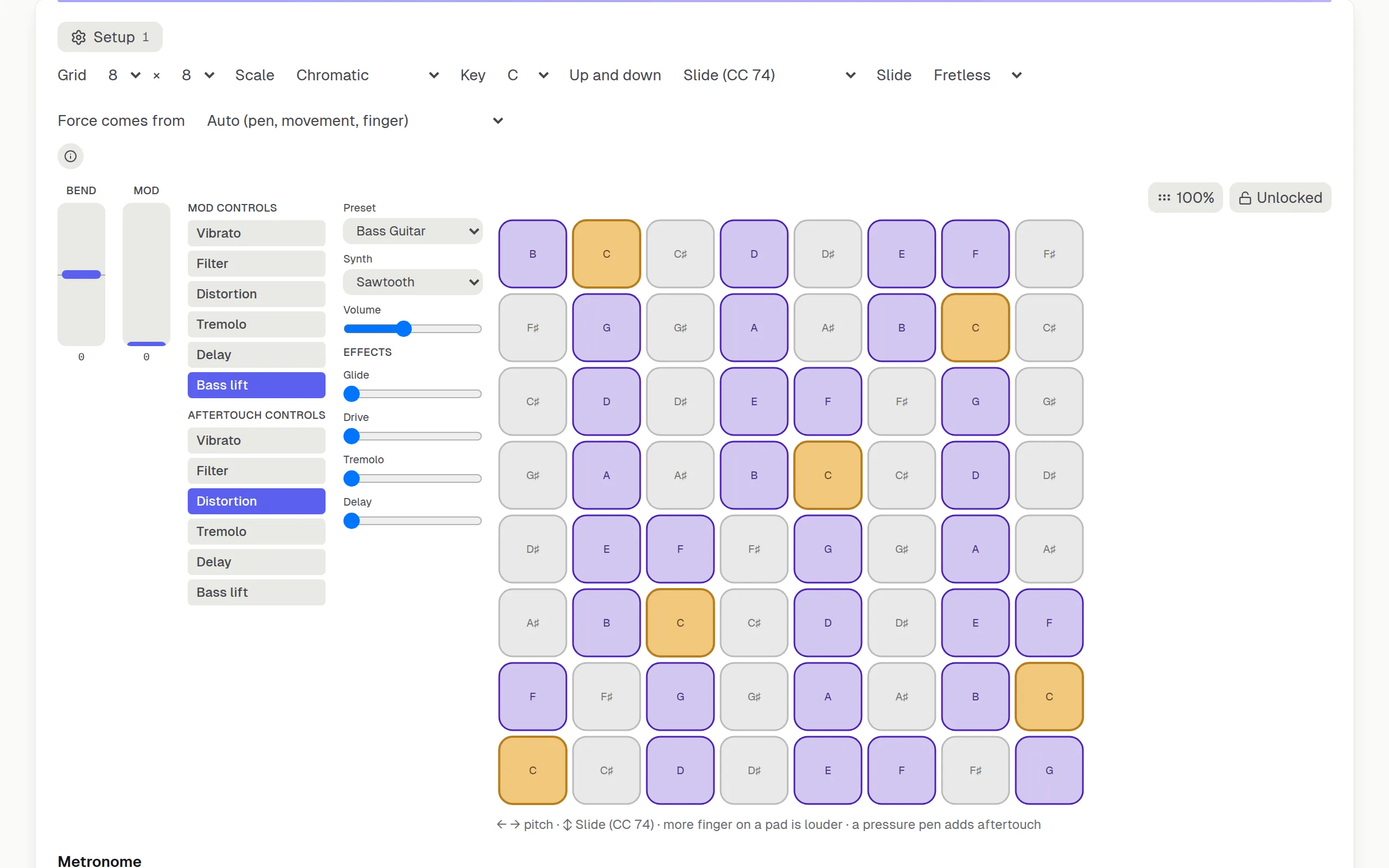
To be clear about what the four views are not: they draw the grid on the screen you already have, and anything you plug in over MIDI is graded like any other input. Reading a pad controller pad by pad, and lighting the next pads on it, is Pad Run’s job, and it stays experimental for each model until that model has been checked on real hardware.
The next pad, lit under your hand
Playing on the grid, the song is drawn onto the board you are actually touching rather than onto a picture of one beside it.
- A ring fills around the next pad over the two seconds before it is due
- A trail shows the four steps ahead, so your hand walks rather than jumps
- The route through the grid is worked out once for the whole song, so the lanes and the board can never point at different pads
- The cue follows the instrument, not the view — read the notation and the pad still lights
- A note with no pad on the current grid is reported, never quietly dropped
Pad Run, the game mode
Choose a song and a difficulty, then play it on an 8 × 8 or a 4 × 4 grid as the notes come down a highway. Every note is judged, a streak builds a multiplier, and the run ends with a grade.
- Perfect, Great, Good or Miss on every note, and ×2 to ×4 for a streak
- A 3-2-1 on screen before the first note, and nothing to hear but your notes and the song’s other parts
- Speed, loops and Wait Mode turn a run into practice
- A personal best for each song and difficulty, synced when you sign in
Curriculum
Lessons, reordered by goal
Forty-seven lessons, each with a quiz and a play-along exercise generated for it, plus unit exams and a review queue that asks a missed question again rather than only listing it. Pick a theory path and the order changes to suit it — nothing is added, nothing is removed, and every lesson still has to be earned. Drums and Your instrument leave those forty-seven alone and bring a track of their own.
- Eight paths: six re-order the same lessons, one is the drums, one is your own instrument
- A daily session picked for you: what is due, what is next, what is weakest
- Four lessons free with no account at all
Eight paths
Say what you came to learn and the app puts it first. Six paths reorder the same forty-seven lessons around a goal; one is the drums, and one is the instrument you play.
Harmony
Triads, sevenths and progressions first; scales and transposition when you need them.
Composition
Progressions and form, aimed at writing your own rather than analyzing somebody else's.
Reading music
The staff, clefs, and ledger lines, with a Clef Trainer sprint once you are fluent.
Sight-reading
Timed from the start, on an exercise generated fresh each day.
The complete musician
All forty-seven lessons and every exam, in a better order than the default.
Just for fun
A short mixed session — a few notes, a few chords, and the progression behind most pop songs.
Drummer
From a first steady beat to a 32-bar chart, on the drum pads — graded in Play Along, in the styles you pick.
Your instrument
The part that is not theory — holding it, tuning it, and the first things worth practising, for whichever one you play.
- Harmony reaches triads without making you finish modes, harmonic and melodic minor, and transposition first — three lessons you did not come for.
- Reading opens the staff at step two instead of step thirty-five, and Sight-reading puts a timed exercise in front of you from its very first stage.
- A session mixes what a path is for: a lesson, an ear-training drill at the difficulty it is ready for, a sight-reading exercise generated fresh that day, and a recording of the instrument where hearing it is the point.
- Say which instrument you play and the lessons draw their shapes on that one — plus a track of its own: forty-eight lessons across guitar, bass, keys, the pad grid and the stylophone, about holding, tuning and practising the thing rather than about theory.
Curriculum & Exams
A syllabus, not just a sandbox.
Seven structured units walk from pitch and intervals through key signatures, chords, rhythm, and advanced harmony, each lesson ending in a quiz. Every unit then has its own timed exam, and a comprehensive final covers all seven at once. Questions are drawn from a bank far larger than any single sitting asks, and the answer order is shuffled too, so a retake is a genuinely different paper rather than the same one again. A question you got wrong — in a lesson or in an exam — comes back in a review queue on your dashboard and is asked again there, not merely listed, alongside whatever your ear-training stats say still needs work.
Digital Instruments
An instrument in your pocket
Four instruments — a stylophone, a pad grid, a theremin and a playable staff — where every note bends, slides and swells on its own. Play them with a finger, a pen, or by tilting and moving the phone: they sound straight away, and send MPE to your DAW when you want them to.
- Every note bent, slid and pressed on its own — sent as MPE, one channel per note, up to 15 at once
- Played with tilt, movement, an S Pen and how much finger lands — not just a tap
- With the free helper running, each instrument gets its own MIDI port — one track each in your DAW
MPE Instruments
Expression you play, on its own channel.
A stylophone, a pad grid that doubles as a bass, a theremin and a playable staff, each sending real MPE — every note takes its own channel, so a bend belongs to one note instead of the whole part. You assign what each axis drives: a drag, a phone’s tilt, a pressure pen. The first three are sold separately; the playable staff is free for everyone. The built-in synth plays every gesture straight away; to hear per-note bend in a DAW, use an MPE host such as Live 11.
Ear Training
Hear it, then name it
Intervals, chords, scales, progressions and more, generated fresh every time and played through the same synth the instruments use. Answer on screen, on a MIDI keyboard, or by singing or playing into the microphone.
- Eight categories, each with four difficulty tiers
- Answerable by ear and by hand — MIDI in counts as an answer
- Your weakest category is what the daily session offers you next
And everything around them
The tools the four above lean on, and the ones that are just useful to have.
Fretboard Navigator
Modes, scales, arpeggios and chords drawn on bass or guitar, in nine guitar tunings and seven bass, with every position lit.
Circle of Fifths
How the keys relate, as a wheel you can turn and press to hear.
Interactive Staff
Read and play notes on a standard staff in any key, with the accidentals written where they really sit.
Rhythm Trainer
Tap along to a pattern and see where you were early and where you were late.
Clef Trainer
Name the note, against the clock if you want. Treble, bass and the grand staff.
Unit exams
A paper at the end of each unit, measuring the unit rather than the route you took through it.
Drum School
Forty-nine graded lessons on on-screen pads, from a first backbeat to a 32-bar chart, with rock, pop and punk grooves played along to rather than read about.
Instrument lessons
The instrument itself rather than the theory: how to hold it, tune it and practise so it sticks — eight lessons each for guitar, bass, keys and the stylophone.
Take Studio
Record what you play at full resolution, edit it on a piano roll or as notation, put chords under it, and export it with its curves intact. Open it on the playable staff, or on any instrument in the app.
Score generator
Endless sight-reading built from the rhythms, scale or chord, metre, tempo and range you choose — as notation, as tab, or both. Exports to MIDI, Guitar Pro or MusicXML, or goes straight to Play Along.
Tuner
Guitar and bass, four to eight strings, with drop, open and step-down tunings and an adjustable reference pitch. It reads out in tenths of a cent and tracks down to a five-string bass low B.
Audio to MIDI
Play a synth in your DAW with your own instrument. Notes are tracked from an interface or a microphone and sent as MPE, so slides and vibrato travel as real pitch bend. One note at a time. Analysis takes 33–85 ms depending on how low you play, and your audio interface and DAW add their own buffers either side of that. Chrome or Edge.
Progress and XP
Levels, streaks, achievements and a daily goal — with a dashboard that says what to do next rather than only what you did.
Friends and challenges
Follow people, react to what they finish, set each other challenges, and compare on a leaderboard.
Start with a song. Stay for the theory.
No account needed to start